

Views: 5 Author: Greenport Marketing Dept. Publish Time: 2026-09-18 Origin: Site

Summary
Magnetic USB-C cables sit outside the USB Type-C specification, and the most common real-world complaint isn't fire. It's a tip that stops charging reliably after a few months. Whether a magnetic cable is a good buy comes down to three things: the pin count (1-pin tips can't move data at all, 24-pin tips can carry 40 to 80Gbps and video), the rated power path, and whether a worn tip can be swapped instead of binning the whole cable. This guide walks through each one, with the failure modes buyers actually report.
Ask a hardware forum about magnetic USB-C cables and you'll get two answers. One camp says they're out of spec and will never be safe. The other says plenty of good products live outside a spec and work fine. Both have a point, and neither helps a buyer pick a product.
We make magnetic cables and adapters in Houjie, Dongguan, and we sell them to brands and distributors who then have to answer their own customers. So this article doesn't pretend the risks away. It explains where they come from, which ones a product decision can actually reduce, and how to match pin count to the job.
01
A recent thread on Reddit's r/UsbCHardware is a useful sample, because the original poster had already bought magnetic cables twice. He switched to them after wearing out the USB port on an old phone. A budget set worked for a few months, then needed several snaps before charging would start. A pricier set lasted longer but, within a year, showed the same problem plus something worse: the phone said it was charging while the battery kept falling overnight. A warranty replacement fixed it for a while, then the fault came back.
Three or four years later he asked whether the category had improved. The replies argued about specifications. Nobody posted a long-term recommendation. That gap is the real market problem, and it's mostly about contact wear, not about electrons jumping out of the cable.
| Reported symptom | Likely cause | What to check before buying |
|---|---|---|
| Needs several snaps to start charging | Spring pins losing force, worn plating, dirt on the contact face | Plating, pin design, and whether tips are sold separately |
| Shows charging, battery drops | High contact resistance causing repeated drop-outs and renegotiation | Pins per power line, magnet hold on a stiff cable, a clean face |
| Cable falls off too easily | Magnet too weak for a thick, high-wattage cable | Cable outer diameter and a pull test on samples |
| No data, or no external display | Pin count too low for the job | The pin table in section 04 |
| Tips from another brand don't fit | There is no shared standard for magnetic faces | Buy tips and cables from the same product line |
Source: r/UsbCHardware, "Recommendations for proven magnetic USB-C cables?". Causes and checks are our engineering reading of the reported symptoms.
02
The most misread claim in this category
No magnetic USB-C cable is "USB-IF certified" as a magnetic connector. The USB Type-C specification defines a plug and a receptacle. It doesn't define a magnetic joint, so there's nothing to certify it against. A seller can hold CE, FCC or RoHS paperwork for the product, and a cable can carry an E-Marker, but neither makes the magnetic interface itself spec-compliant. If a listing says otherwise, ask for the certificate number and check it.
Why does that matter? USB-C power delivery was built around a plug that slides in and out. A source only turns on VBUS after it sees a device on the CC line, and removes it when that device disappears. A plug leaving the socket over a few millimetres gives that detection time to act. A magnetic tip that gets knocked off separates almost instantly, so power can still be flowing at the moment contact breaks. PCWorld flagged exactly this, along with debris and static on exposed pins, and quoted users who say they damaged laptops.
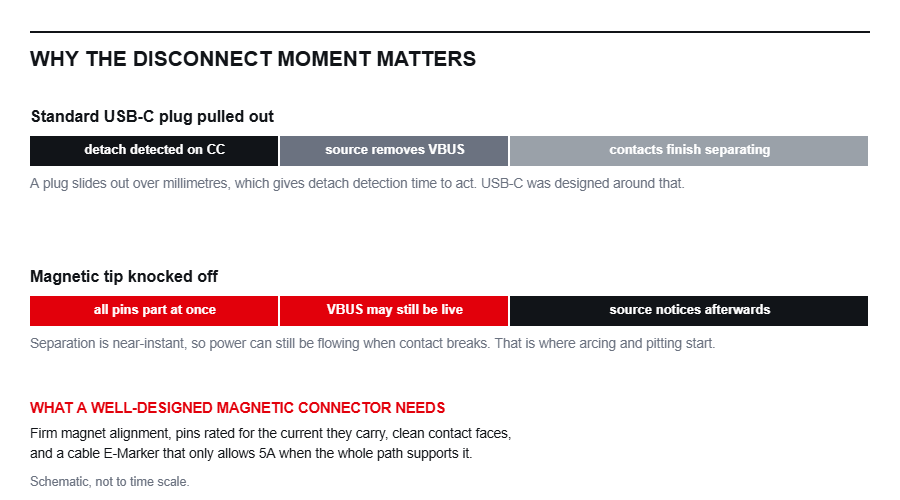
Schematic, not to time scale. A sliding plug gives detach detection time to work; a magnetic breakaway doesn't.
That was the counter-argument in the thread, and the reply to it is worth knowing. MagSafe on a MacBook uses a handful of large pins, and no USB Power Delivery negotiation runs across the magnetic joint; the negotiation happens at the USB-C end of the charger. Apple designed the charging circuit in the laptop around the magnet. A third-party adapter that fits inside a USB-C port can't add that circuitry to your phone, so it has to live with the risks rather than design them out.
So the honest position is this: a magnetic USB-C cable is a trade. You accept a connector that isn't in the spec in exchange for less wear on the device port and a cable that breaks away instead of dragging a laptop off a desk. A good product narrows that trade. It can't erase it.
03
The failure most users hit is slow, not dramatic. The contact face is exposed all day. Spring-loaded pins cycle every time the cable snaps on. Pocket lint, dust and steel filings are drawn to the magnet. Each of these adds a little resistance, and at charging current a little resistance becomes heat and voltage drop.
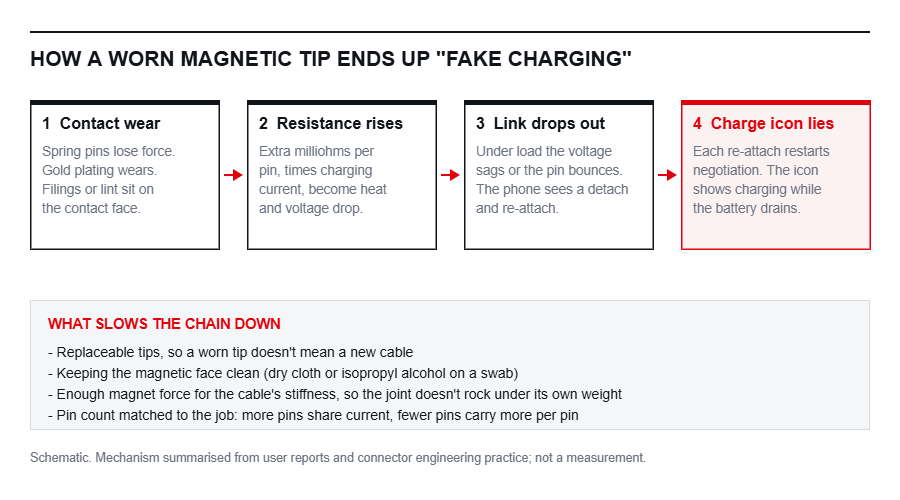
Schematic. The chain behind the "charging icon on, battery going down" complaint.
Once the voltage sags or a pin bounces, the phone sees a detach and a re-attach. Every re-attach restarts negotiation, and some phones keep showing the charging icon through it. That's the "fake charging" users describe. It isn't a software bug, and a replacement cable only fixes it until the new contacts wear the same way.
| Design choice | Why it matters over time |
|---|---|
| Replaceable tips | The tip is the wear part. If it's sold on its own, a worn contact costs a tip, not a cable. |
| Copper in the cable | Thin conductors add resistance before the joint even starts. Ask for strand count and diameter, not just "pure copper". |
| Pins per power line | Current shared across several pins means less load on each one. |
| Magnet hold vs cable stiffness | A heavy 240W cable levers a weak magnet. A joint that rocks is a joint that arcs and wears. |
| Rotating heads | 180-degree and 540-degree heads let the cable exit the way it wants to go, so less side load reaches the pins. |
Care note you can pass to end users
Wipe the magnetic face of both the tip and the cable with a dry cloth, or a swab with a little isopropyl alcohol, whenever charging turns flaky. Keep the cable end away from loose metal. And if a charge session looks wrong, unplug the cable at the charger rather than pulling the tip under load.
Our view
If you only ever audit one thing on a magnetic cable sample, make it the contact joint after a few hundred snaps, not the headline wattage. Wattage is easy to print on a box. A joint that still charges cleanly after months of use is what stops the returns.
04
A USB-C plug has 24 contacts. A magnetic tip passes only the ones it has pins for, so the pin count sets the ceiling. That's why two cables that look alike can behave completely differently: one charges a laptop and drives a monitor, the other can't sync a photo.
| Pins | Charging (our range) | Data and video | Good fit |
|---|---|---|---|
| 1-pin | Up to 5V 2.4A | None. Charge only | Low-cost bedside and car charging, light-up styles |
| 4 / 5 / 7-pin | 3A to 5A with QC3.0; our 7-pin line reaches 100W | Data transfer supported | Everyday phone cables |
| 9-pin | 60W, 100W and 240W versions | Data transfer supported; USB-A versions are USB 2.0 | Phones, tablets and laptop charging with a 540-degree head |
| 16-pin | 3A, 60W and 240W versions | Data transfer supported; USB-A versions are USB 2.0 | Laptop charging, flat-insert and 180-degree designs |
| 24-pin | 240W | 40Gbps with 8K@60Hz (T8 to T10); 80Gbps with 16K@60Hz (T11, T12) | Docks, monitors, fast external SSDs |
Source: GREENPORT product catalogue (April 2026) and model specification sheets. Where a data rate isn't listed above, we confirm it in writing for the exact SKU you order.
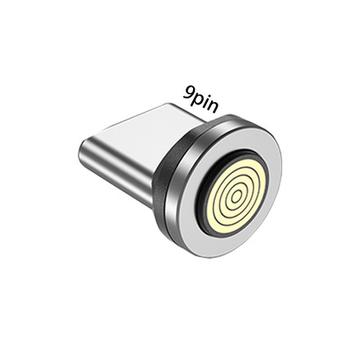
9-pin tip. Concentric rings let the cable attach at any angle, which suits rotating heads.
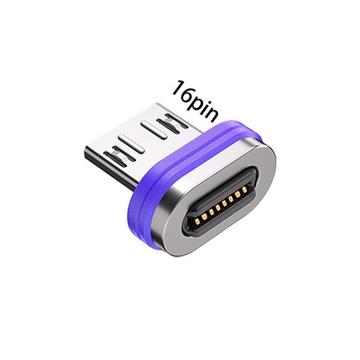
16-pin tip. A row of spring contacts; it seats in one of two orientations.
240W under USB PD means 48V at 5A. A charger will only offer 5A when the cable identifies itself as 5A-capable through an E-Marker chip. So a 240W magnetic product needs three things lined up: pins rated for the current, conductors thick enough for it, and an E-Marker that tells the truth. If any link is missing, the charger should fall back to a lower power level. That's safe, but it isn't the 240W on the box.
Data works the same way. USB 2.0 needs only one pair of data lines and tops out at 480Mbps. 40Gbps and 80Gbps links need the high-speed pairs, which is why only 24-pin tips carry them. If a buyer wants to drive an external monitor through a magnetic joint, 24-pin is the only format in this table that can do it.
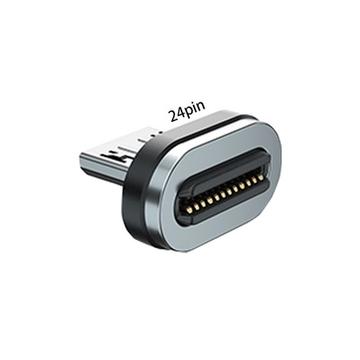
24-pin tip. The only format here that passes high-speed data and video.

1-pin tip. Charging only, no data. Fine for a nightstand, wrong for a laptop.
05
Our magnetic range runs from 1-pin charge-only cables to 24-pin USB4-class adapters. Most sourcing conversations end up in one of the three groups below.
A09M9 is a 240W-rated Type-C magnetic cable with a 540-degree rotating head, a nylon braided jacket and aluminium alloy shells; A10M9 adds a digital power display. The T4 adapter brings the same 9-pin, 540-degree format to a cable the user already owns. Tips are sold separately in Type-C and Micro USB versions, so a worn tip is a cheap fix. This is the line for phone and tablet users who want one cable that also tops up a laptop.
These are flat-insert 16-pin cables rated for 240W. The cable is a 6-core, 48-carrier nylon braid at 3.5mm outer diameter, with two power groups of 50 strands of 0.1mm copper and four data groups of 10 strands. A06M16 adds a 180-degree rotating head, A07M16 adds a digital display, and the T15 adapter packs the 180-degree head and display into a plug-on unit. Pick this line for laptops where the cable should leave the port flat.
T8 is an ultra-slim 24-pin adapter rated for 240W, 40Gbps and 8K@60Hz video; T9 and T10 are the L-shaped and T-shaped versions. T11 and T12 raise the ceiling to 80Gbps and 16K@60Hz and add a digital display. These are the adapters to specify for docks, monitors and external SSDs, where a lower pin count simply won't pass the signal.
For any 240W model, ask us to confirm the E-Marker and negotiated power for the exact SKU in writing; that's the check that matters at 5A. Every finished cable also goes through a function test before packing. It's the same station used across our USB-C cable production, and it's where charging and data paths are checked on each unit.
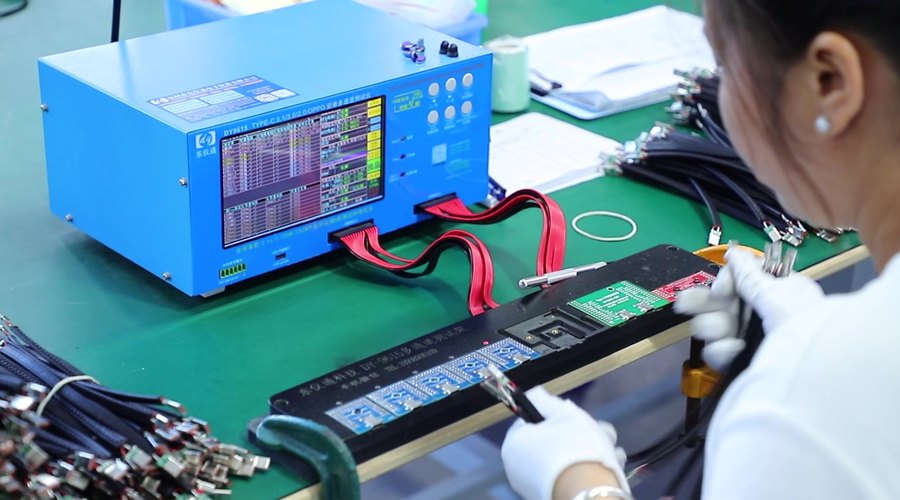
Function test fixture on our cable line in Houjie, Dongguan.
Paperwork, with scope
Our ISO 9001 certificate (No. 98925Q00388R0S, valid to 2028-07-17) covers the research, development and production of data cables. Our amfori BSCI audit carries Monitoring ID 25-0333274. Product test reports are issued per model, so tell us the exact SKU and target market and we'll send what applies to that model. We won't describe any magnetic product as USB-IF certified, for the reason given in section 02.
06
They carry risks a normal plug doesn't: live disconnects, exposed pins and debris. Those risks are smaller with a firm magnet, current-rated pins, a correct E-Marker and a clean contact face. They are not zero, and anyone who says the connector is "in spec" is wrong.
Usually worn or dirty contacts. The connection drops and reconnects under load, and each reconnect restarts charging. Clean both faces first. If that doesn't fix it, replace the tip.
1-pin tips can't. 4-pin and up can. For 40Gbps or 80Gbps and external displays, you need a 24-pin tip and adapter.
Our 9-pin A09M9 and A10M9 are rated for 240W. The laptop, charger and cable all have to support 240W for it to be used. Otherwise the charger negotiates a lower level.
Don't count on it. There's no shared standard for magnetic faces, even between products with the same pin count. Buy tips from the same line as the cable.
Ask for samples of the exact SKU. Use a USB PD tester to read the negotiated voltage and current, copy a large file to measure data speed, and snap the tip on and off a few hundred times before you test again. Certificate numbers in this article can be checked with the issuing body.
Send us your target market and use case. We'll come back with:
A pin-count recommendation with the matching models
Specification sheets, including confirmed data rate per SKU
Samples for your own snap and power testing
Custom logo, colour and packaging options
Tell us the devices your customers use and the wattage you need, and we'll quote the line that fits.
Sources
USB Charger (USB Power Delivery), USB-IF
USB4, USB-IF
Recommendations for proven magnetic USB-C cables?, r/UsbCHardware
Teardown and exploration of Apple's MagSafe connector, Ken Shirriff, 2013
GREENPORT product catalogue, April 2026, and model specification sheets

| | 10 Floor, Building B, Section 1, GangHuaXing Industrial Park, Fuhai Street, Bao'an District, Shenzhen City, Guangdong Province, PRC |
| | +86 18928270207 |
| | Jack@ucig-r.com |