

Views: 24 Author: Greenport Marketing Dept. Publish Time: 2026-11-11 Origin: Site

Our verdict Worth it for phones, controllers and small accessories you plug in every day. Skip it for high-wattage laptops, data backups and cheap cables left charging overnight. | 7/10 Overall |
| Convenience One hand, any angle, in the dark | | 9/10 |
|---|---|---|
| Port protection The tip takes the wear instead of the port | | 8/10 |
| Fast charging Real speed depends on pins, wire and charger | | 6/10 |
| Safety at high power A half-connected joint is the weak point | | 4/10 |
| Data reliability A blip can corrupt a transfer | | 3/10 |
Editorial scores for magnetic charging cables as a category, not lab measurements of one product.
Good for +Phones at the desk or bedside +Game controllers and VR headsets +Earbud cases, power banks, small cameras | Skip it for -Laptops at high wattage -External SSDs, backups, firmware updates -Cheap, unknown cables charging overnight |
By Greenport Marketing Dept. | Last updated: 10 November 2026
Key takeaways
Magnetic charging cables give up a little electrical reliability in exchange for a lot of convenience. They don't charge faster or safer than a normal cable.
The magnetic joint is not part of the USB Type-C specification, so device warranties may not cover damage it causes.
The riskiest moment is a half-connected joint while power is flowing, not a cable sitting still.
Most real-world complaints are mild: contacts that wear, collect dust, or charge slower than advertised.
Buy a cable with clear specs and replaceable tips, clean the contacts, and keep a standard cable for data and backups.
How we judged this
We combined long-term user reports, the questions buyers bring to our after-sales team, the USB Power Delivery documentation, and our own product specifications. Scores and verdicts are our editorial judgement for the category. We make magnetic cables, and say so where our product comes up.
In this article
| 01 | What is a magnetic charging cable? |
| The short answer | A charging cable split in two: a small tip that stays in your device and a cable head that snaps onto it with a magnet. |
The tip plugs into the USB-C (or Micro USB) port once and stays there. Power, and on some versions data, passes across the magnetic face through spring-loaded pins or ring contacts. Tips are typically described by pin count. Fewer pins usually means charging only; more pins can carry data, and the highest pin counts can carry video.
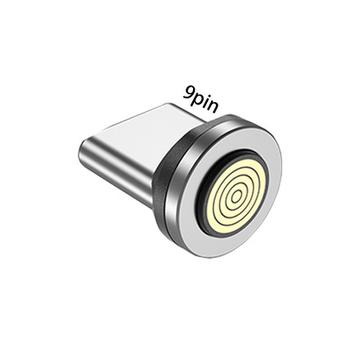
Product image. A 9-pin magnetic tip. It stays in the port, and the cable snaps onto its ring contacts from any angle.
| 02 | What are the pros and cons of magnetic charging cables? |
| The short answer | The benefits are all about convenience and port wear. The drawbacks are about the exposed, non-standard joint. |
Pros: why people love them +Less port wear. The port is plugged once instead of over a thousand times a year. +One-handed charging. Works in the dark, in a car, or with your other hand full. +Breakaway. A tripped cable lets go instead of pulling the device off the table. +Dust plug. The tip keeps pocket lint out of the port. +Rotating heads. 180-degree and 540-degree heads reduce cable strain while gaming or holding the phone sideways. | Cons: why critics push back -Outside the USB-C standard. The magnetic joint isn't defined or tested by the specification, so warranty cover may not apply. -Exposed contacts. The magnet attracts metal dust, and the contacts are less protected against static than a recessed port. -Unstable contact under load. A joint knocked half off while power is flowing can spark or overheat. -Overstated fast charging. Many cables deliver less than the box says, and slow down as contacts wear. -Unreliable for data. A split-second disconnect can corrupt a file transfer or backup. |
Who's right? Both sides, for different uses. The benefits show up every day on low-power devices you plug in often. The risks grow with power and with how often the joint gets knocked while charging.
| 03 | What do long-term users actually report? |
| The short answer | Mostly gradual wear and slower charging, not fires. Serious damage is rare and tends to involve high power or cheap cables. |
We reviewed long-term user reports and our own after-sales questions, then grouped what people describe by how often it comes up and what is usually behind it.
| What users report | How often | Usual cause | What helps |
|---|---|---|---|
| Works fine for years on phones and accessories | Common | Low current and frequent plugging, which is exactly what the format suits | Keep using it; clean contacts occasionally |
| Needs several snaps before it starts charging | Common | Worn spring pins, worn plating, dirt on the contact face | Clean both faces; replace the tip |
| Charges slower than advertised | Common | Too few pins, thin conductors, or a charger and phone that can't match the rating | Measure with a USB PD meter; buy a cable with published specs |
| Shows charging, but the battery still drops | Occasional | High contact resistance causes repeated disconnect and reconnect | Replace the tip; stop using it if it persists |
| Comes off in the car | Occasional | Side knocks, or a stiff cable levering a weak magnet | Use a mount; route the cable so it can't pull sideways |
| Tip overheats or damages a port | Rare | Partial contact under high power, or debris across contacts | Avoid high wattage on cheap cables; stop if the connector gets hot |
Frequency is our qualitative reading of the reports we reviewed, not survey data.
| 04 | Which common claims about magnetic cables are true? |
| The short answer | One is true, two are false, and the rest are partly right depending on the cable and how you use it. |
| Claim | Verdict | Explanation |
|---|---|---|
| Magnetic cables are not part of the USB-C standard. | True | The USB Type-C specification defines a plug and a socket. It does not define a magnetic joint. |
| They protect your charging port. | Mostly true | They cut wear on the port. The tip becomes the wear part instead, so replaceable tips matter. |
| The magnet won't hold in a car. | Partly true | A strong magnet holds on rough roads. Side knocks, like the phone sliding into a cubby wall, are what separate it. |
| Static electricity will fry your phone. | Mostly false | Static damage is uncommon in modern phones, but exposed contacts are less protected than a recessed port. |
| There is always high voltage on the exposed pins. | False | A USB-C charger supplies 5V until it negotiates a higher level with the device. |
| Magnetic cables can't fast charge. | False | Some can. Many deliver less than advertised, so the rating needs checking. |
The fact most people miss
The danger isn't a cable sitting still on your desk. It's a joint that's half off while power is flowing. Laptop makers that build their own magnetic connector design the whole charging circuit around that moment. A generic tip added to a USB-C port can't, which is why damage reports cluster around laptops and high-wattage charging.
| 05 | How does a magnetic cable compare with a standard cable or a magnetic wireless mount? |
| The short answer | A magnetic cable sits in the middle: more convenient than a standard cable, faster than wireless, but less standardised than either. |
| Factor | Magnetic cable | Standard USB-C cable | Magnetic wireless mount |
|---|---|---|---|
| Wear on the device port | Low, the tip stays in | Higher with daily plugging | None |
| One-handed connection | Yes | No | Yes |
| Charging speed | Up to the cable's rating, if phone and charger match | Full USB PD up to the cable's rating | Slower than a good wired connection |
| Data transfer | Some versions; not ideal for backups | Yes | No |
| Breaks away when pulled | Yes | No | Phone lifts off |
| Covered by the USB-C specification | No | Yes | Not applicable; uses wireless charging standards |
| Best for | Phones, controllers, small accessories | Laptops, data, backups | Cars and motorcycles |
| 06 | Is a magnetic charging cable worth it for your use? |
| The short answer | Yes for frequent, low-power charging; with care in the car; no for high-wattage laptops, data and unattended cheap cables. |
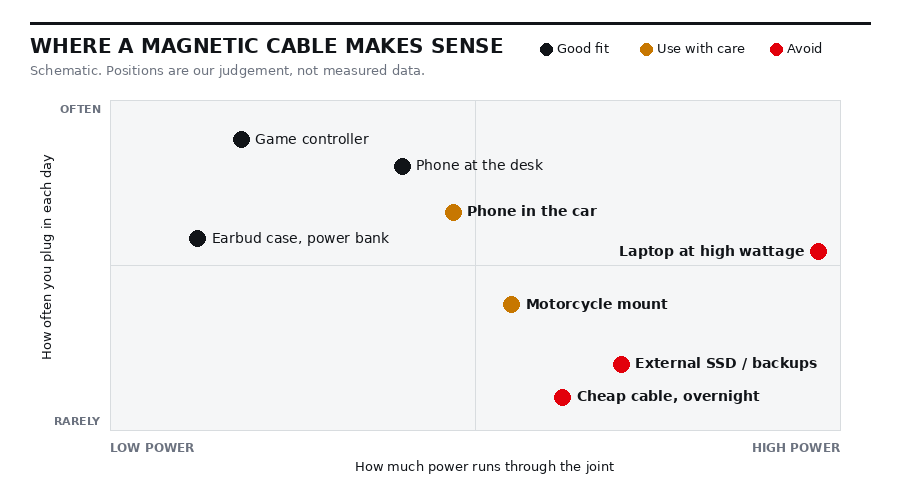
Original graphic, schematic. Positions reflect our judgement of each use, not measured data.
| Use | Verdict | Why |
|---|---|---|
| Phone at the desk or bedside | Good fit | Many daily plug-ins at moderate power, which is what the format is for. |
| Game controller or VR headset | Good fit | Snapped on and off every day; breakaway saves the cable when you get up. |
| Earbud case, power bank, small camera | Good fit | Low current, low risk, real convenience. |
| Phone in the car | Use with care | Choose a strong magnet and route the cable so the phone can't slide sideways. |
| Motorcycle mount | Not ideal | Constant vibration, rain and road dust work against an exposed joint. |
| Laptop at high wattage | Avoid | Highest power and highest cost if a half-connected joint fails, unless the laptop maker designed the connector. |
| External SSD, backups, firmware updates | Avoid | A split-second disconnect can corrupt data. |
| Cheap, unknown cable charging overnight | Avoid | Nobody is awake to notice a connector getting hot. |
| 07 | How do you choose and maintain a magnetic charging cable? |
| The short answer | Check five things before you buy, then keep the contacts clean. |
Published specs. Rated wattage, charging protocol, data support and tip types should all be listed.
Believable wattage. 240W needs thick conductors and pins rated for the current. Be wary of high ratings on very cheap cables.
Replaceable tips. The tip is the wear part; replacing it should cost a tip, not a cable.
Data, if you need it. Many magnetic cables are charge-only. Check before you rely on one for syncing.
Case fit. Make sure the tip sits flush with your phone case.
Wipe both magnetic faces with a dry cloth every few weeks, and straight away if charging turns flaky.
Keep the cable end away from loose metal in bags and car consoles.
Stop using it if the connector feels hot, looks discoloured or smells burnt.
Don't mix tips and cables from different brands. There's no shared standard for the magnetic face.
Keep a standard cable for backups, large file transfers and travel.
For the engineering detail behind contact wear and pin count, see our pin-by-pin magnetic USB-C safety guide.
| 08 | Which GREENPORT magnetic cable fits which use? |
| The short answer | Choose by pin count. 1 to 5 pins cover everyday phone charging, 7 to 11 pins add faster charging with data, and 16 and 24 pins carry up to 240W, with 24-pin adapters adding high-speed data and video. |
Pin count is the quickest way to match a magnetic cable to the uses in the verdict table above. More pins let a cable carry more current and more data lines; fewer pins keep the tip simple and inexpensive. Here is how our range lines up.
| Pins and models | Charging | Data | Head options | Good for |
|---|---|---|---|---|
| 1-pin A01M01, A06M01, A09M01 | Up to 5V 2.4A | Charge only | 360 or 540-degree rotating; luminous and LED styles | Accessories and bedside charging where data isn't needed |
| 4-pin A05M10 | 9V 2A, 5V 3A, QC3.0 | Yes | Flat insert | Everyday phone charging with syncing |
| 5-pin A01M05 to A05M05 | 3A fast charging, QC3.0 | Yes | 360 or 540-degree rotating | Phones and controllers, the common everyday choice |
| 7-pin A02M12, A08M12, A07M14 | 3A or 5A; PD 60W and 100W versions | Yes | 360 or 540-degree; L-shaped; retractable | Phones and tablets, gaming with an L-shaped head |
| 9-pin A09M9, A10M9, A06M9 | USB 3A up to PD 240W | Yes | 360 or 540-degree; L-shaped; spiral; 3-in-1 and 6-in-1; digital display | Phones, tablets and laptops at moderate wattage |
| 11-pin A01M11, A02M11 | PD 60W and 100W | Yes | Flat insert, 6-in-1 | Tablets and multi-device kits |
| 16-pin A04M16, A06M16, A07M16 | USB 3A or 5A; PD 60W and 240W | Yes | Flat insert; 180-degree rotating; digital display | Laptops and high-wattage phones |
| 24-pin A05M24, A06M24 | PD 60W, 100W and 240W | Yes | Flat insert cables; straight, L and T-shape adapters | Laptops, docks and monitors |
Source: GREENPORT magnetic charging cable product sheet, 2026. Charging figures are the rated maximums listed per series; actual speed depends on the device and charger. Data rates other than the 24-pin adapters below are confirmed per SKU.
Pin count and the verdict table
For the uses we rated Good fit, a 1-pin to 7-pin cable is usually enough. If you want to charge a laptop magnetically despite the risks covered above, use a 9-pin, 16-pin or 24-pin cable rated for the wattage and keep the joint where it can't be knocked.
The A09M9 magnetic fast charging data cable is the one we point most phone and tablet users to when they want a single magnetic cable that can also top up a laptop. It covers the checks in our buying guide and turns with the way you hold the device.
| Specification | A09M9 |
|---|---|
| Connector | 9-pin magnetic, ring contacts, Type-C cable |
| Charging | PD 240W, with 100W, 27W, 18W and 12W levels; 5A |
| Head | 540-degree rotating |
| Jacket and shell | Nylon braided jacket, aluminium alloy shells |
| Magnetic tips | Type-C and Micro USB, sold separately |
| Data | Supported; data rate confirmed in writing per SKU |
| Related versions | A10M9 adds a digital power display; A05M9 and A06M9 are the 60W and 100W versions |
A09M9 against our 5-point buying check
| Check | Result | Notes |
|---|---|---|
| Published specs | Pass | Wattage, pin count, tips and materials listed |
| Believable wattage | Pass | 240W rating on a 9-pin connector with a braided cable |
| Replaceable tips | Pass | Type-C and Micro USB tips sold separately |
| Data support | Confirm | Supported; data rate confirmed in writing per SKU |
| Case fit | Check | Depends on your phone case; ask for a sample tip |
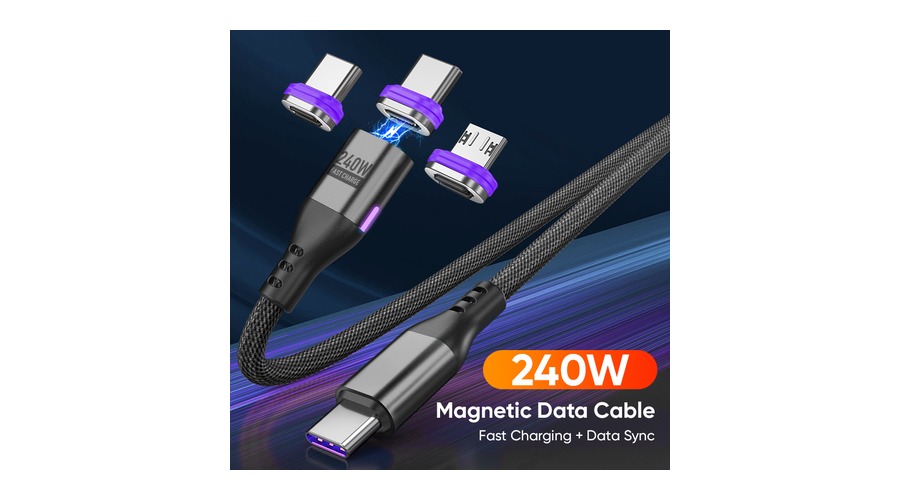
Product image. A GREENPORT 240W magnetic data cable with Type-C and Micro USB tips.
Our T-series magnetic adapters turn an existing USB-C cable into a magnetic one, so you keep the cable you trust and only add the joint.
| Adapter | Pins | Rating | Head |
|---|---|---|---|
| T4, T6 | 9-pin | 240W | 540-degree rotating |
| T16 | 9-pin | 240W, digital power display | 540-degree rotating |
| T3, T7 | 16-pin | 240W | 180-degree rotating |
| T15 | 16-pin | 240W, digital power display | 180-degree rotating |
| T8, T9, T10 | 24-pin | 240W, 8K video, 40Gbps | Straight, L-shape, T-shape |
| T11, T12 | 24-pin | 240W, 16K video, 80Gbps, digital display | Straight, T-shape |
24-pin adapter video and data ratings are as listed in our product sheet; the connected cable, device and display must support the same level.
What 240W does and does not mean
240W is a rating. Your device, the charger and the cable all have to support a power level before it is used; otherwise the charger settles on a lower one. We don't describe any magnetic product as USB-IF certified, because the magnetic joint isn't covered by the USB-C specification.
| 09 | Frequently asked questions |
Not by default. Used for everyday charging, a good one reduces wear on the charging port. Problems usually come from cheap cables, dirty contacts, or high power flowing through a joint that has been knocked half off.
Some can. Many advertise more than they deliver. The cable, the charger and the phone all have to support the same fast charging level, so check what your phone actually negotiates with a USB PD meter.
Yes, with care. A strong magnet holds on rough roads. What usually separates it is the phone sliding sideways, so use a mount or a tight cubby and route the cable so it can't be pulled at an angle.
Only if the cable is rated for data, and even then a standard cable is the better choice for backups, external drives and firmware updates, because a split-second disconnect can corrupt files.
No. The USB Type-C specification defines a plug and a socket, not a magnetic joint, so no magnetic cable can be certified against it as a magnetic connector.
It depends on what you charge. A 1-pin tip handles basic charging with no data. 4 to 7 pins add fast charging and data for phones. 9 to 16 pins carry up to 100W or 240W depending on the model, and 24-pin connectors add high-speed data and video on supported adapters.
It depends on use and cleaning. The tip is the part that wears, so choose a cable whose tips are sold separately; replacing a worn tip is cheaper than replacing the whole cable.
Tell us the devices your customers use and the wattage they need. We'll come back with:
Samples across our 1-pin to 24-pin range, matched to your devices
Specification sheets with the confirmed data rate for each SKU
Magnetic adapters if you'd rather keep your own USB-C cables
Custom logo, colour and packaging options
Sources
USB Charger (USB Power Delivery), USB-IF
Are Magnetic USB-C Cables Safe? A Pin-by-Pin Buyer's Guide, GREENPORT, September 2026
GREENPORT magnetic charging cable product sheet, 2026, and product catalogue, April 2026

| | 10 Floor, Building B, Section 1, GangHuaXing Industrial Park, Fuhai Street, Bao'an District, Shenzhen City, Guangdong Province, PRC |
| | +86 13215377889 |
| | Jack@ucig-r.com |